
My business grew very organically in 2026, in ways I never anticipated. I love everything I’m doing, but I want to be intentional about how it grows next year, so that I do more of the work that energizes me, work fewer hours, and bring in more revenue.
In September I asked Claude to help me think through my goals for 2027. I gave it a brain dump of everything in my head: what I love, what gives me energy, what drains me, and what I want my life to look like next year. It started with a full sweep: the notes from all of my partner meetings, every goal session I’d had with it, and the market research in my weekly intelligence brief. From that came a plan with several directions I could take, with flags on where I’d said I was most excited to work, where I wasn’t, and where the market signals were strongest. Then it built me a simulation planner, so I could see how much revenue each mix of work would bring in, and approximately how many hours I would need to work each week.
I am using this now to make decisions about the work I take on.
To me, that’s what a very senior chief of staff does. Everyone is talking about AI executive assistants right now. AI that helps you triage your email, keep track of your tasks, and help you focus on your priorities. Mine does all of that, but the real value I get goes far beyond helping me stay organized and focused. My system knows the people involved, the decisions I’ve made, how I feel, and what didn’t work last time, so I think things through with it the way I would with a trusted peer.
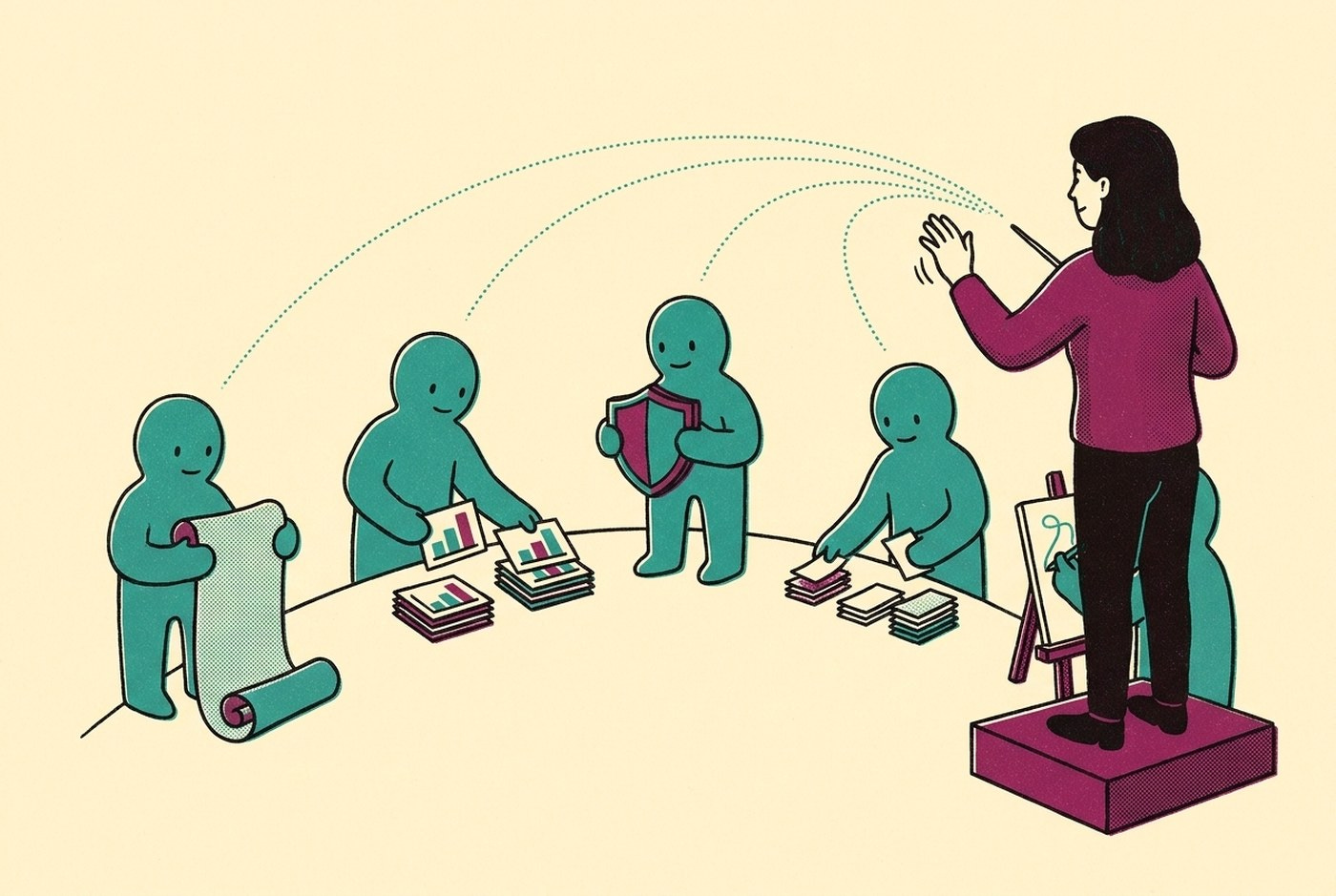
Then I realized I don’t have just one chief of staff. I have several, working on my behalf at the same time. At any given moment, one agent is helping me with my own strategic planning while another builds the slide deck for my next cohort session. Another is building an interactive budget to help a client think through financial scenarios. Another is reading a client’s meeting transcript, our Teams chats, email, and our GitHub repository to update our team’s task list, checking in with me for the go-ahead before it publishes anything. Another is running a security audit. Another is pulling together an expense form from a trip I took last week.
I’ve recently realized that I haven’t built an AI executive assistant. I haven’t even built a chief of staff. I’ve built a team of agents that work alongside me throughout the day. They know me, my goals, how I work, and the decisions I make, so they can work both with me and for me. It has transformed how I work.
The clearest way I’ve found to explain it is the one closest to my own experience: I lead them the same way I’ve led teams of people for most of my career.
Where I started
At the start of this year I used AI the way most people do: as a chat partner for drafting emails and thinking things through. In January I tried to build my website with AI and gave up because the output was hollow and generic.
Then over Easter weekend I built my first AI executive assistant. On day one it planned my day and managed my tasks, which is what most people describe when they talk about their AI assistant. Since then, I have iterated on this system and built new functionality into it, nearly every day. This often comes from listening to a podcast or reading a Substack article, then asking Claude to help me think through how I could adapt what was discussed to fit my system and my way of working.
Six months later, almost everything in my work runs through this system: client work (with full consent of my clients), teaching, writing, business development, and a fair amount of my personal life too.
What a day looks like now
Last Thursday, at 8:30am, I had nine Claude sessions running at once. One was processing a client team’s call and turning it into tasks, another was helping me prepare my monthly webinar, and a third was analyzing the performance of a client’s email marketing campaign and making data-driven suggestions to improve open rates, while four sub-agents were writing and reviewing code for a dashboard I was building. I moved between these sessions, checking in, giving direction, and asking follow-up questions so that I could steer where each went. By the end of the day I had worked across more than 20 sessions. Any tasks that were not finished were documented with handover notes so that a fresh session could pick them up the next morning.
That’s a busy day, but it isn’t unusual. When I’m building something, one agent writes the code while Codex, a second agent, reviews it. I check in on each of them, answer their questions, look at what they’ve produced, and decide what happens next.
I’m the one running the system. I set the direction, I check the work, and I make the final decisions.
Working with a team
For twenty years I’ve led teams and built the systems they run on, almost always in resource-constrained organizations where I wore many hats. As a CEO I grew a team from 20 to 70 people. Over my career I’ve managed or supervised more than 50 people directly.
What I’ve come to learn this year is that there are remarkable similarities between managing people well and managing AI well. A capable new hire on their first day can’t do much for you until they have four things: the right context, a clear sense of your priorities, a picture of what good looks like, and feedback that allows them to improve.
An AI agent needs exactly the same four things. Almost everything I’ve built over the last six months is a way of giving my agents those four things without briefing each one from scratch.
Part 1 - Context: one system every agent reads
Everything I do gets written down in plain text files on my laptop. There are more than 4,500 of them now, including 532 meetings (most with the full transcript), a working file for every project with its decisions and next steps, and a file for every client that describes the current priorities.
On top of that sits a library of more than 1,000 pages (that grows daily), describing my perspective on a topic, the people I engage with, and external sources, with a web of linkages showing how they all connect.
I have an index file that acts as a table of contents, helping my agents quickly identify what they need, so they don’t need to read every file each time (which would take far too long and use far too many tokens).
Because of this “knowledge graph” of my work, I’m able to write a poorly formatted prompt into Claude, often no more than a few words, and it follows the instructions and index files to understand exactly what I’m working on, why it matters, where I left off, and what to do next.
If you open a Claude session without this operating system underneath and ask what the next step is on a procurement you’re running, it has nothing to read, so it asks you to explain. Mine reads nine things first.
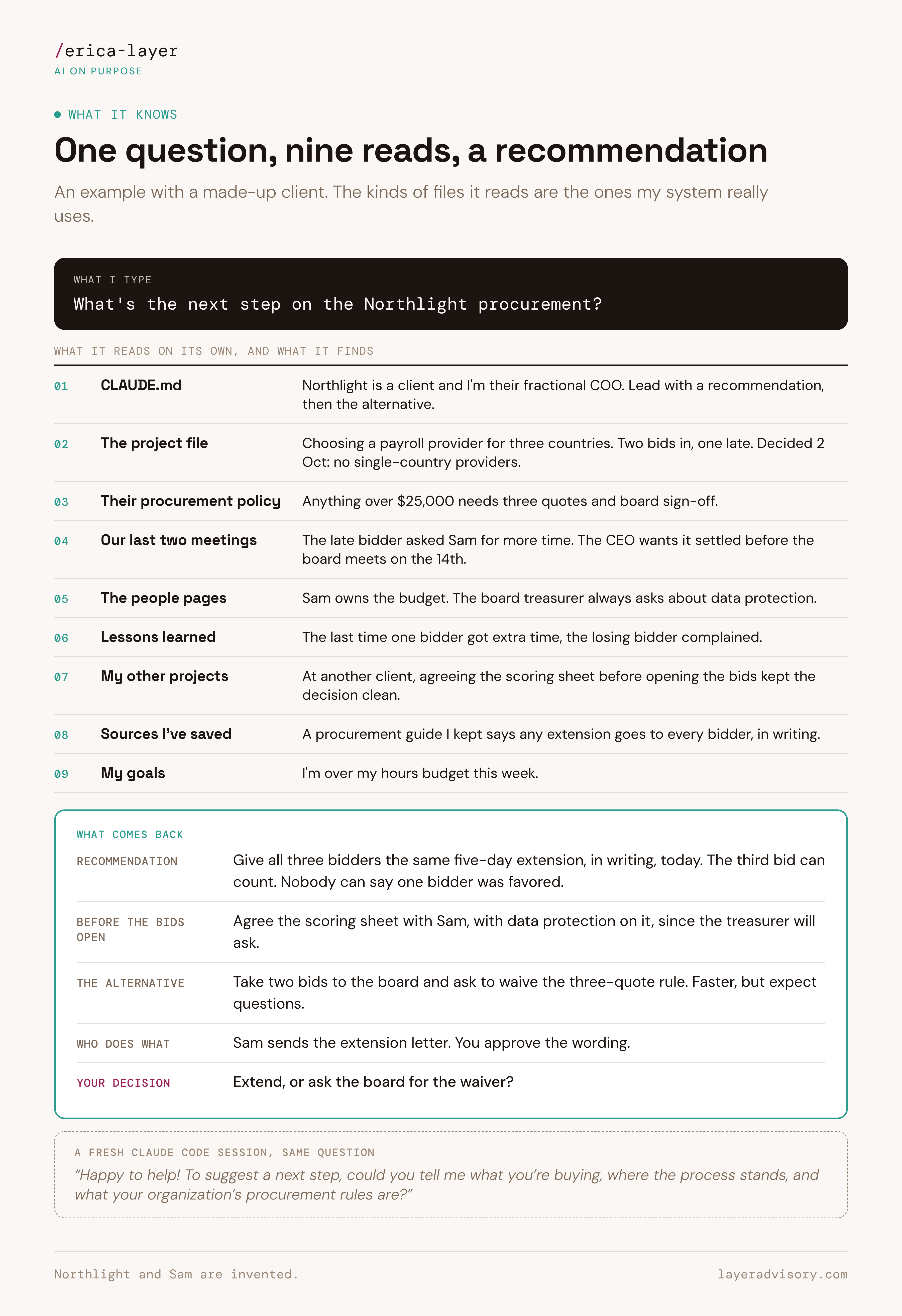
In the made-up example above, this is what Claude would read after I ask a simple question, and the depth of the response I would get back.
Part 2 - Priorities: the goals it holds me to
After I had the strategy session that I described at the beginning of this post, Claude built a tab in my dashboard that holds my goals, and the key items I’ve committed to doing to reach them. Every day, it reviews what I’ve done and suggests which actions I’ve taken that are aligned with my goals and documents them in the dashboard.
When I’m considering an opportunity, my agents bring me back to those goals. If I’m about to say yes to something that is not aligned with my goals, they tell me (quite directly). I’ve said no to several opportunities lately because of this.
My system understands a similar level of priorities for each thing I’m working on. For every project, initiative or ongoing accountability, I define the goal I’m trying to achieve and rank its importance so my agents can calibrate each time they work on that thing.
Part 3 - What good looks like: standards written down
I wouldn’t ask a new team member to write a donor report without giving them a detailed briefing about the donor, our history, the feedback we’ve gotten in the past, and with examples of previous reports that show the quality standard we expect.
I also wouldn’t do this with my agents.
Before an agent takes on a piece of work that matters to me, I tell it (using Whispr Flow, a tool that lets me speak to my laptop) everything that I would tell a person. I take significant time to explain the judgement and knowledge that lives in my head. I ask AI to structure this in a format that it can read from, and that it can grade itself against to determine if it has delivered the quality that I expect.
For nearly everything I ask AI to produce now, I use a graded loop (which I shared in my September webinar). One agent does the work, and a second agent grades it against the criteria that I have set. If it doesn’t pass, the agent passes it back with feedback so the first agent can make improvements until the quality improves to my standards (or it tells me what needs my attention).
This is then turned into a repeatable skill so that next time, it starts from the knowledge it gained in the last session and produces better results each time.
Part 4 - Giving feedback it remembers
Whenever an agent gets something wrong or doesn’t do something in the way I would myself, I tell it, using the same language I would give a colleague. With my operating system, that correction gets written down in my markdown files so that the next time it does a similar task, it notes what I suggested the last time and doesn’t make the same mistake again. I don’t have to manually log this feedback; I simply need to explain what I would do, and the system writes it down.
How it knows me and gets better over time
When people in my cohort build their own system, they sometimes feel disappointed on the first day when the system doesn’t “know” them.
Think about a good assistant on their first day compared with their sixtieth. On day one you explain everything. By day sixty you say “plan my day” and they already know your clients, what happened yesterday, and how you like your mornings, because they took notes after every meeting and read them before the next one.
That’s all my system is doing.
Every Claude session starts out knowing nothing except what it can read, so what I’ve really built is a set of plain text files (markdown files, which open in any text editor) organized so that Claude knows what to read, where to look, and what to write down afterwards.
The instructions are what make that work.
CLAUDE.md is the first thing every session reads. It tells Claude who I am, who the people in my work are, where everything lives, and what to save before it finishes. It’s a lot like the onboarding pack I’d give someone joining my team, except it gets read every single time, by every agent that takes on a task.
It remembers because it writes things down. At the end of a piece of work it updates the project’s file with what was decided and what happens next. Every afternoon a routine reads through the day’s sessions and catches anything that didn’t get saved. In the evening, another routine writes the library pages from the day’s meetings.
A preferences file started out empty; when Claude notices how I like things done, it suggests a line for me to approve. Every time I edit an email draft before sending it, the difference goes into my voice profile. And every night it writes down a few observations about how I made decisions that day, which I look through once a week.
That’s also how it gets better. Each session leaves the files a little richer than it found them. The corrections that matter become rules the next session reads. None of it is complicated on its own. What took time was building it up, one file and one correction at a time.
What runs without me
Some of my agentic team works on a schedule. Most of those routines report back to me on a dashboard I check during the day.
At 12pm each day, one sorts my inbox and drafts replies in my voice, which I approve or edit and send out.
After every meeting, another files the transcript and pulls out the action items.
Overnight, one prepares a short brief for each of tomorrow’s outside meetings.
Another collects the receipts from my inbox into a spreadsheet.
Once a week a security check runs across the whole system.
On Sundays a routine builds a brief from the sources I follow, which I listen to on Monday as a private podcast during my morning run.
When a routine needs a decision from me, it shows up on the dashboard as a card I can say yes or no to, so nothing it suggests happens until I’ve looked at it.
Where I stay in charge
My agents can only access the accounts and folders I’ve chosen to connect. The folders holding my most sensitive information aren’t connected at all. Within that, each agent gets only the access it needs.
When I send one off to research or check something, it can read but can’t change anything.
When one is building, it works in its own separate copy of the code, away from the live version.
Nothing reaches the live version until I’ve reviewed it.
Every routine also has its own limits written into its instructions, so it follows them even when I’m not around. I wouldn’t give a new hire the keys to the finance system on their first day. I don’t give them to an agent either.
I wrote a one-page authority ladder in August that sets out, action by action, what an agent can do on its own, what needs my approval, what it can only draft, and what it can never do (like move money). Anything that can’t be undone comes to me first, apart from a few routine messages I’ve approved in advance.
Like a new hire, an agent gets more responsibility as it proves reliable. Once a month Claude can propose moving an action up a tier, with the evidence for it. I decide whether it moves.
Some things agents never touch, like anything involving money. I wrote much more about this in How I think about security in my AI operating system.
Six months in
I can’t overstate the changes I’ve seen this year. I didn’t realize at the beginning how valuable this kind of architecture would be for building a system that truly compounds over time. It knows me and my work because I do that work in Claude Code. Every session leaves it knowing a little more.
I know there’s a lot of talk right now about “confidence theater,” where people boast about the amazing things they’re doing with AI and most of it turns out to be smoke and mirrors. I try to be as transparent as I can about what I’m building and what AI is making possible for me.
My system isn’t perfect. It makes mistakes. I’m constantly iterating, explaining myself, and working to improve it. And I spend multiple hours each week maintaining it. I’m learning every day. The investment I make has an outsized ROI that makes it more than worth it.
But when I say it has changed my life and what I’m capable of, that is the truth.
I’ve spoken to many people, and taught over 50 in the last few months to take this system and tailor it to how they work. The people who get the most out of it, who have told me that the system has changed their lives too, are the ones who apply the same level of curiosity and rigor to it.
They are actively managing, directing and building their system. When something doesn’t work, they dig in with AI to figure out why. When they want the system to change, they have a session where they explain what they want, then work with AI to build it. At the beginning, it’s not perfect. But as you work with it over time, it compounds and builds into a system that is far more than people expect possible.
If you’re where I was in January
If you’re using AI as a chat partner right now, that’s exactly where I was at the start of this year. It’s a perfectly good place to start. If you’d like to try one thing this week, ask Claude to interview you, one question at a time, for a one-page file about who you are, what you’re working on, and how you like things done. Then put it somewhere Claude reads every time (a project’s instructions work well). It’s the first page of an onboarding pack for AI.
If you’d like help along the way, I offer training to build agentic operating systems. I’ve now taught more than 60 people to build the system described above in Claude Code through my TEMPO Build program, which is best suited for people who are actively using AI but want to build a more advanced system. The next cohort will start in January.
I’m also currently working on a more introductory course, TEMPO Work, that will help you build your first AI executive assistant and learn the tools, skills and mindset to use AI well.
And I work one-on-one with people through individual sessions where I tailor the content to exactly where you are and your real work.
You can register or join the waitlist for any of these on the TEMPO page on my website.
Whichever way you start, start the way you would with any new hire: tell it who you are and what matters, then lead it from there.
The authority ladder is the part most teams skip when they copy a setup like this. For marketing teams I'd start it with one rule: agents can prepare anything, but nothing customer-facing moves without a named owner. Then widen it workflow by workflow, based on how often that owner actually changes the output.
Writing corrections into files that later sessions read is the step most people skip, and it's what turns a pile of sessions into a system. How do you keep that corrections file from growing so long that agents stop following the older rules?